
Watchlist & Daily Digest
Track the names you care about and get the daily digest — a repeatable process beats hot takes.
Why a watchlist
Following a fixed set of names consistently is different from scanning for whatever looks interesting on any given day. A watchlist is a list of stocks you have chosen to pay attention to over time — a constraint that pushes you toward a repeatable process rather than reacting to the noisiest signal of the moment.
That consistency is useful: when you see a stock's AI score or valuation gap today, you have context from yesterday and last week. Change means more when you have a baseline. Chasing new names every session gives you no such anchor. The watchlist is a tool for building that baseline on the names you have already decided are worth watching.
Adding names
There are two ways to add a stock to your watchlist. On every stock page, the Add-to-Watchlist button sits in the AI Scorecard header — you can add directly from any full stock analysis page without navigating away. On the watchlist page itself, a search bar lets you find and add symbols without going to each stock page individually.
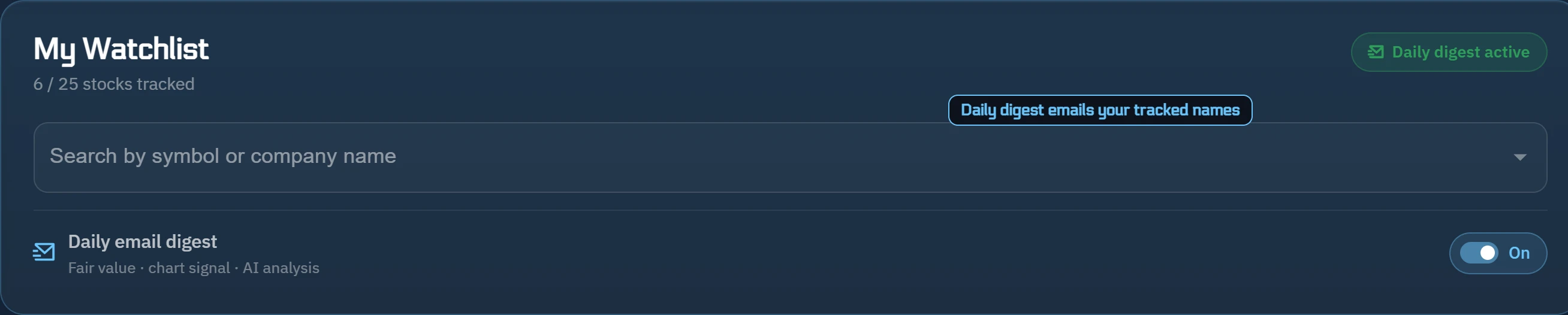
The watchlist header shows a tracked-count label — 'N / cap stocks tracked' — so you can see how many names you are following and how close you are to the plan limit. Keeping the list focused makes the daily digest more useful; a shorter list of names you genuinely follow is easier to act on than a long one you assembled during a single screening session.

The daily digest
When notifications are enabled, the 'Daily digest active' badge appears on your watchlist page. The daily digest is an email summary covering the stocks on your watchlist — their current AI scores, any notable signal changes, and other tracked metrics — delivered on a regular schedule so you get a consistent checkpoint without having to log in each day.
The digest is a summary, not a trade list. It gives you a regular read on how signals are moving for your tracked names. What you do with that information — whether to look more closely at a particular stock, to revisit the full stock page, or to do nothing — is your judgment to make. The digest is designed to support a repeatable review process, not to substitute for one.
Access
The watchlist is part of the paid plan; the 7-day free trial includes it.
To enable the daily digest, turn on notifications in your watchlist preferences. The 'Daily digest active' badge confirms the feature is on. If you do not see the badge, check that notifications are enabled in your account settings.
Try it on a real stock
See ŷRobot's AI analysis on any U.S. stock — free, no account needed.
Analyze a Stock FreeŷRobot analysis is AI-generated and quality-gated; nothing on this page is investment advice.